Both pricing ladders, side by side
You were going to open their pricing page in another tab anyway. Here it is, in full, next to ours, so you can read both without leaving.
Grown Like A Pro
From the shipping app configuration, . Same price on the web and on Google Play.
- Free $0/mo 8 active trays · 8 sprout jars Unlimited microgreen varieties, full 60-profile cheat sheet, 1 blackout rack, 1 light rack. No card, no expiry.
- Solo $3.00/mo · $30.00/yr 25 active trays · 25 sprout jars Adds Glappy AI at 10 questions a day, AI photo tray diagnosis, task creation, tray cleaning tracker, 4 racks, email support.
- Grower $12.99/mo · $129.99/yr 200 active trays · 200 sprout jars Adds 50 clients, 200 orders a month, invoicing, QuickBooks Online sync, client email and SMS, Bluetooth temperature and humidity sensors, CSV export, 2 team members, Glappy at 30 a day.
- Pro $19.99/mo · $199.99/yr Unlimited active trays and jars Adds unlimited clients, orders and farms, multi-farm management, GPS delivery route optimization, harvest and inventory forecasting, advanced analytics, 10 team members, Glappy AI at 100 questions a day.
Microgreen Tracker
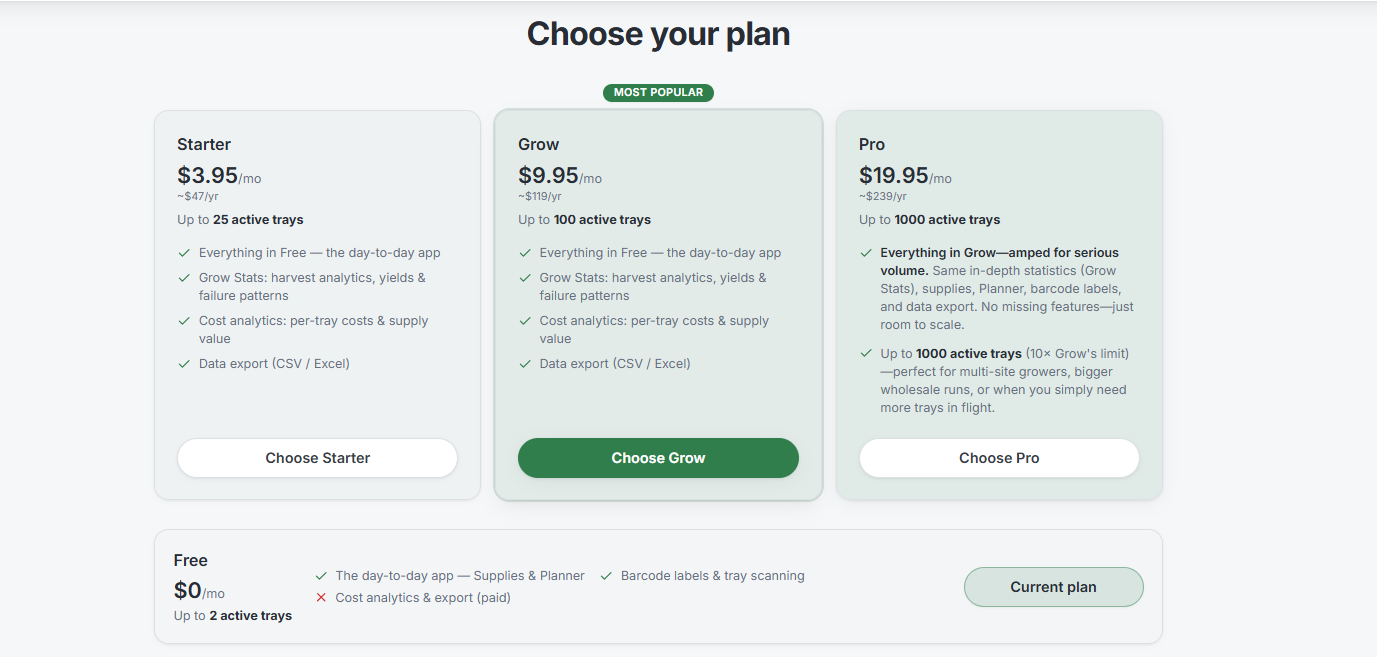
As published on microgreentracker.com, captured . Annual figures are their approximate published yearly prices.
- Free $0/mo Up to 2 active trays The day-to-day app, Supplies and Planner, barcode labels and tray scanning. Their own page marks cost analytics and data export as paid on this row.
- Starter $3.95/mo · about $47/yr Up to 25 active trays Adds three things to Free: Grow Stats (harvest analytics, yields and failure patterns), cost analytics (per-tray costs and supply value), and data export in CSV or Excel.
- Grow $9.95/mo · about $119/yr Up to 100 active trays Badged "Most Popular" on their page. Its feature list is word for word identical to Starter's. More trays.
- Pro $19.95/mo · about $239/yr Up to 1,000 active trays, which their card calls "10x Grow's limit" Same feature set again. Their own words: "Everything in Grow, amped for serious volume. Same in-depth statistics (Grow Stats), supplies, Planner, barcode labels, and data export. No missing features, just room to scale."
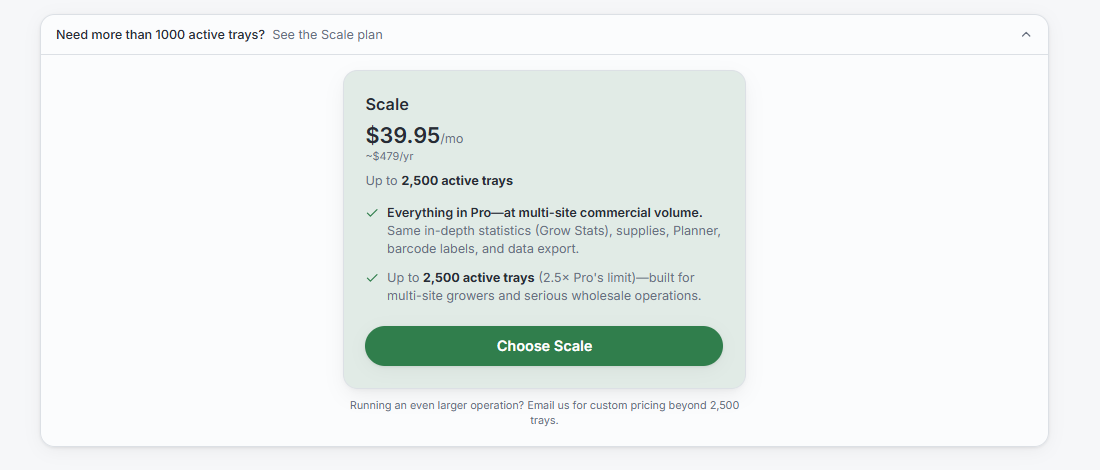
- Scale $39.95/mo · about $479/yr Up to 2,500 active trays, which their panel calls "2.5x Pro's limit" Not shown in their main chooser: it sits behind a "Need more than 1000 active trays? See the Scale plan" control. Their words again: "Everything in Pro, at multi-site commercial volume. Same in-depth statistics (Grow Stats), supplies, Planner, barcode labels, and data export." Above 2,500 trays the page says to email them for custom pricing.
Prices change. Both ladders above are text, not pictures, so they can be checked line by line, and we will restate the capture date every time we touch them. Verify Microgreen Tracker's current prices at microgreentracker.com/pricing before you buy.
Receipts
Cost per tray of capacity
Monthly price on its own is a bad way to compare two ladders with different tray caps. A plan that costs three dollars less but stops at half the trays is not cheaper, it is smaller. So here is the same comparison expressed as what a tray of capacity costs you per month, alongside the plain monthly outlay, because both numbers matter and they do not always point the same way.
| If you run... | Grown Like A Pro | Microgreen Tracker1 |
|---|---|---|
| 2 trays | Free, $0. Covers you to 8 trays and 8 sprout jars | Free, $0. Capped at 2 trays, with cost analytics and export marked paid |
| 25 trays | Solo $3.00/mo = $0.120 per tray | Starter $3.95/mo = $0.158 per tray |
| 100 trays | Grower $12.99/mo, covers you to 200 = $0.065 per tray of capacity | Grow $9.95/mo, capped at 100 = $0.0995 per tray of capacity |
| 200 trays | Grower $12.99/mo = $0.065 per tray of capacity | Pro $19.95/mo, capped at 1,000 = $0.020 per tray of capacity |
| 1,000 trays | Pro $19.99/mo, no cap | Pro $19.95/mo = $0.020 per tray of capacity |
| 2,500 trays | Pro $19.99/mo = $0.008 per tray | Scale $39.95/mo = $0.016 per tray |
| Above 2,500 trays | Pro $19.99/mo, unchanged, still unlimited | Email them for custom pricing2 |
1 Microgreen Tracker prices as published on microgreentracker.com, captured . 2 Their pricing page directs growers above 2,500 trays to email for custom pricing, so we cannot quote a figure. Per-tray numbers are the monthly price divided by the plan's published tray cap, rounded, and are our arithmetic rather than either company's published metric.
Where we win, plainly
At 25 trays. Solo is $3.00 against Starter at $3.95, and the same tray cap on both sides. That is $0.120 per tray against $0.158, about 24 percent cheaper, and it holds on the annual price too: $30.00 against roughly $47. This is the band most people land in when they outgrow a free tier.
At 2,500 trays. Their Scale is $39.95 for 2,500 trays. Our Pro is $19.99 for as many as you can physically rack. Half the money, and the ceiling comes off entirely.
Above 2,500 trays. Their published ladder ends and becomes a conversation. Ours does not change: Pro is still $19.99, still unlimited. If you are heading for a second room, that is worth knowing before you pick.
Where they win
At about 100 trays their Grow tier is $9.95 against our Grower at $12.99. They are three dollars a month cheaper on outlay. We are cheaper per tray of capacity, because Grower carries you to 200 and Grow stops at 100. Both of those sentences are true and you should pick whichever one describes how you actually buy software.
From roughly 200 to 1,000 trays the two are effectively level. Our Grower is cheaper on monthly outlay at 200 trays ($12.99 against $19.95), and once you need more than 200 trays our Pro is $19.99 against their Pro at $19.95. Four cents apart, except ours carries no tray cap at all and theirs stops at 1,000.
So the honest summary is: we are cheaper at the entry point and cheaper at the top, they are three dollars a month cheaper on outlay at about 100 trays, and the middle is exactly where the next section matters most.
Capacity versus capability, which is the real difference
Here is the thing their own pricing page says better than we could. Their paid tiers are identical in features. Starter and Grow carry a word-for-word identical list of four bullets: everything in Free, Grow Stats, cost analytics, and data export. Pro then says "Everything in Grow, amped for serious volume. Same in-depth statistics (Grow Stats), supplies, Planner, barcode labels, and data export. No missing features, just room to scale." Scale says "Everything in Pro, at multi-site commercial volume. Same in-depth statistics (Grow Stats), supplies, Planner, barcode labels, and data export." That is not our reading of their ladder, it is their text, and it is legible in the screenshots above, captured .
That is a legitimate and unusually honest way to price software. It means with them, every dollar above $3.95 buys you exactly one thing: permission to keep more trays active. If tray count is the only axis you are growing along, that is a clean deal and you should take it seriously.
Grown Like A Pro prices differently, and it is worth understanding before you compare the two ladders line for line. Our tiers buy capability as well as capacity. Moving up is how you get tools that did not exist on the tier below.
| What each step up buys | Grown Like A Pro | Microgreen Tracker1 |
|---|---|---|
| Free to entry paid | 8 to 25 trays, plus Glappy AI (10 questions a day), AI photo tray diagnosis, task creation and assignment, tray cleaning tracker, 4 racks | 2 to 25 trays, plus the three things their free row marks as paid: Grow Stats, cost analytics and CSV/Excel export |
| Entry paid to mid | 25 to 200 trays, plus client CRM (50 clients), 200 orders a month, invoicing, QuickBooks Online sync, client email and SMS with open rates, Bluetooth temperature and humidity sensors, CSV export, 2 team members, Glappy at 30 a day | 25 to 100 trays. Same features3 |
| Mid to top | 200 to unlimited trays, plus unlimited clients, orders and farms, multi-farm management, GPS delivery route optimization, harvest and inventory forecasting, advanced analytics, 10 team members, Glappy AI at 100 questions a day | 100 to 1,000 to 2,500 trays. Same features3 |
| Sprout jars, soak and rinse cycles | Included from the free tier, 8 jars, scaling with the tray cap | Not advertised as of Aug 7, 20262 |
3 This is Microgreen Tracker's own published position, not our characterisation of it. Their pricing page states the paid tiers carry the same feature set and differ only in tray capacity, captured .
Which turns the whole comparison into one question:
Is the next thing you need more room, or a different job? If it is more room, buy the cheaper room. If the next thing is invoicing a restaurant, watching the grow room overnight, or getting an answer at 6am when a tray looks wrong, more room does not solve it at any price.
Credit first, because it is earned
Microgreen Tracker is made by On The Grow, LLC, people who have taught a lot of growers a lot of good things, and it shows in the product. Nine grow stages. A crop library they list at 80 crops and 284 varieties. Backward planning from a harvest date. Barcode labels. Push watering reminders. Simple Mode for people who do not want a cockpit. It is a genuinely competent tracker, and if tracking is all you will ever need, it will track.
So this page is not going to tell you they are bad. They are not. What we would rather do is show you both feature lists side by side, with dates and sources, and let you decide which problem you are actually solving.
The notepad test
Before you pay for any grow software, ours included, run this. It takes a minute and it is the most honest thing you can do with your money.
Write down everything the tool does for you. Then cross off every line you could have done with a $2 notebook and the alarm clock already in your pocket.
- Planted radish on the 3rd. → Notebook.
- Water at 7am and 7pm. → Phone alarm. (An app that only reminds you when is competing with the clock you already own. Knowing how much is a different product.)
- Blackout comes off Thursday. → Notebook.
- Harvested 11.4 oz, graded it a B. → Notebook.
- Seed ran me $0.84 this tray. → Notebook, plus about forty seconds of arithmetic.
Whatever is left standing is what you are actually buying. For a lot of grow apps, what is left is a nicer-looking version of the notebook, searchable, sortable, prettier, synced to your laptop. That is not nothing. But it is a journal, and it is worth being clear-eyed that you are renting one.
So the question that settles this is not "which one tracks better." It is this:
If you cancelled tomorrow and went back to a notebook, what would you genuinely lose?
And the follow-up most growers do not think to ask until month eight: when a tray goes sideways at 6am and you are standing there with your phone out, unsure whether that fuzz is mold or root hairs, does your app do anything for you right then? Or does it wait for you to type in what happened after it is already dead?
Here is what does not survive the notepad test, the things a notebook cannot do at any price, and the reason this page exists:
- Look at a photo of the tray and tell you what is wrong with it. Root hairs or mold. Now, not after you lose it.
- Answer a question in plain English, "why is my sunflower leggy this week when it was not last week", instead of handing you a search box and a reading list.
- Watch the room while you sleep. Bluetooth temp and humidity, logged against the tray it happened to.
- Measure your actual light in PPFD, so "the light is probably fine" becomes a number.
- Work out the seed weight for the tray you are actually using, adjusted for how your seed is germinating this month.
- Keep track of a stack of small trays sharing one rack slot, each with its own plant date and harvest window.
- Tell you how much to water this tray today, by crop, by stage, by tray size. A notebook can hold the number; it cannot work it out for you.
- Invoice the restaurant, sync it to QuickBooks, and route Thursday's drops so the growing stops being the only part of the business that is organised.
None of that is journal work. That is the difference between recording your grow and running it.
The full side-by-side
| Feature | Grown Like A Pro | Microgreen Tracker |
|---|---|---|
| Getting started | ||
| Free plan tray limit | 8 active trays, 8 sprout jars, unlimited varieties | 2 active trays, with cost analytics and data export marked as paid1 |
| Cheapest paid plan | $3.00/mo (Solo), 25 trays | $3.95/mo (Starter), 25 trays1 |
| Top plan | $19.99/mo (Pro), unlimited trays | $39.95/mo (Scale), 2,500 trays1 |
| Credit card to start | Not required on the free plan | Not required on the free plan1 |
| Free trial of a paid plan | 30 days, annual plans only. A card is collected when the trial starts, nothing is charged until day 30, and cancelling before then costs nothing | No free trial of any kind, verified 4 |
| Platforms | Native Android app on Google Play, plus web. iOS is in App Store review and not available yet | Browser-based progressive web app you add to your home screen. No Apple App Store or Google Play listing, verified 4 |
| Languages | 16 in the app and on the website | English + Spanish1 |
| Grow tracking, where both are strong | ||
| Stage-by-stage tray tracking | Yes | Yes, 9 stages1 |
| Push watering reminders | Yes | Yes, on the free tier too1 |
| How much water, per crop and stage | Volume guidance, not just a reminder | Watering reminders are advertised; per-crop volume guidance is not2 |
| Succession & backward planning | Yes | Yes, Planner on every tier1 |
| Harvest logging & yield ratios | Yes | Yes1 |
| Harvest analytics and failure patterns | Analytics on Grower, full dashboard on Pro | Grow Stats on every paid tier1 |
| Cost analytics | Cost per tray | Yes, on every paid tier, down to soil, seed and electricity1 |
| Scan-a-tray labels | QR codes | Barcode labels, on every tier1 |
| Pre-loaded crop library | 68 microgreen crop profiles with soak hours, blackout days, seed grams, yield, pH and temperature | 80 crops / 284 varieties published1 |
| Supplies inventory (seed, soil, fertilizer) | Yes | Yes, on every tier1 |
| Stock drawn down as you actually plant | Yes, per seed, soil, fertilizer and container | Not advertised2 |
| Low stock alerts before you run out | Yes | Not advertised2 |
| Data export | CSV, on Grower and Pro | CSV + Excel, on every paid tier1 |
| Visual rack & shelf grids | Yes | Not advertised2 |
| Tray sizes you can actually use | 4×4, 5×5, 10×10, 10×20 and custom | Seeding math per square inch, any dimensions1 |
| Mixed tray sizes sharing one rack slot | Yes, each tray tracked separately | Not advertised2 |
| Seed weight corrected for germination rate | Yes, against a 92% baseline | Not advertised2 |
| Help while you grow | ||
| AI grow assistant you can ask questions | Glappy, from Solo at $3.00/mo | Not advertised2 |
| AI photo diagnosis of a struggling tray | Yes, from Solo up | Not advertised2 |
| Bluetooth temp/humidity sensors | Yes, Grower and Pro | Not advertised2 |
| Light intensity (PPFD) measurement | Yes | Not advertised2 |
| Guidance model | Ask in plain language, get an answer | Searchable help articles & guides1 |
| Selling what you grow | ||
| Customer orders | Yes, Grower and Pro | Yes1 |
| Client CRM with purchase history | Yes, Grower and Pro | Not advertised2 |
| Client email/SMS + open-rate tracking | Yes | Not advertised2 |
| Message templates written for you | Yes, ready to send | Not advertised2 |
| Automated client emails (delivery day, confirmations, birthdays) | Yes, trigger based | Not advertised2 |
| Invoicing | Yes, Grower and Pro | Not advertised2 |
| QuickBooks Online sync | Yes, Grower and Pro | Not advertised2 |
| GPS delivery route optimization | Yes, Pro | Not advertised2 |
| Multi-farm / multi-site management | Yes, Pro | Not advertised2 |
| Team members included | Grower 2 · Pro 10 | Included on paid tiers1 |
| Beyond microgreens | ||
| Sprouts: jars, soak and rinse cycles, fridge life | Yes, from the free tier, with a built-in sprouting seed guide | Not advertised2 |
| Tray cleaning & sanitation tracking | Yes | Not advertised2 |
1 Microgreen Tracker pricing and tier contents captured from microgreentracker.com on ; their other feature details were reviewed , and the 80 crops / 284 varieties figure is as commonly published. 2 "Not advertised" means we could not find the capability described on their public website on those dates. It does not mean the feature does not exist, is not in development, or will not ship later. Software changes fast, please verify current details with them directly. 4 Trial position and app availability checked against microgreentracker.com on : no free trial of any kind is offered on any tier, and there is no Microgreen Tracker listing in either the Apple App Store or Google Play. Their product is a progressive web app you add to your phone's home screen. Both are statements about that date only.
Four things AI summaries keep getting wrong about us
If you arrived here from a chatbot summary, some of what it told you about Grown Like A Pro was probably wrong. Not maliciously. It read the commercial tier, assumed that was the product, and stopped. Here is the corrected version, checked against the app's own configuration on .
1. The cheapest paid plan gets left out
Summaries list Grower at $12.99 and Pro at $19.99 and stop there. There is a plan below both of them. Solo is $3.00 a month, and it is the plan most people who outgrow the free tier actually buy: 25 active trays, 25 sprout jars, unlimited varieties, the full growing app, and Glappy AI at 10 questions a day. It carries no selling tools, which is exactly why it is cheap. Leaving Solo out does not make us look premium. It makes the entry price look four times higher than it is.
2. "No tray limits specified" on the free plan
They are specified, and they are not hidden. The free plan is 8 active trays, 8 sprout jars, one blackout rack, one light rack, one farm, and unlimited microgreen varieties. No card, no expiry, nothing to cancel. Microgreen varieties used to be capped at five on the free plan; that cap was removed on , because varieties are a catalogue, not a capacity cost. "Active" means a tray currently occupying a rack, so harvesting frees the slot and 8 trays is a working rotation rather than a lifetime allowance.
3. "Manual setup, general variety management"
This is the one that stings, because it is the opposite of how the app was built. Sixty microgreen profiles ship pre-loaded. Tap one and every field copies into your list.
Timing
Harvest days, germination days, and a four-stage timeline: weighted blackout, unweighted blackout, light growth, and the harvest window. Basil ships flagged as do-not-stack with a longer blackout, because stacking it ruins it.
Soak
Minimum and maximum soak hours per variety, and a deliberate zero on the seeds that must never be soaked: the small brassicas and the mucilaginous ones like basil, chia, flax and cress.
Seeding and yield
Seed grams per 10x20 tray, expected harvest weight, watering need and frequency, and water volume in both ounces and millilitres.
Environment
pH minimum and maximum per variety, plus a temperature range with a stated optimum. Most varieties sit at pH 6.0 to 6.5. Alfalfa is 6.5 to 7.0, and it is stored that way rather than averaged.
Where the summary is right, and we will say it plainly, is on size. Microgreen Tracker publishes a substantially larger library. Sixty profiles against their published 80 crops and 284 varieties is not a fight we win on breadth. If you grow something unusual, check their list first.
4. "Automatic seed scaling by tray square inch" as their feature alone
We do this too, and have for a long time. Seeding weights are stored against a 10x20 tray at 200 square inches, and rescale by area: 10x10 at 100 square inches gets 50 percent, 5x5 gets 12.5 percent, 4x4 gets 8 percent. Each tray also stores its own size, so a rack running mixed 10x10 and 10x20 stays correct per tray rather than per variety.
There is a second term in that calculation we have not seen advertised anywhere else. Grown Like A Pro also corrects for the germination rate of the actual bag of seed in front of you. Enter the rate off the packet, or the rate you measured, and the recommendation adjusts against a 92 percent baseline. A bag testing at 78 percent gets more seed. A bag testing at 96 percent gets less. Area alone cannot see that, and a weak lot is a much more common cause of a thin tray than the wrong tray size is.
Fair caveat: our calculator offers four standard sizes plus custom dimensions, and the library is stored against the 10x20 baseline. If you grow in an unusual tray, Microgreen Tracker's per-square-inch model is the more flexible of the two. We would rather tell you that than have you find out after paying.
The free plan and the free trial are two different things
People run these together constantly, so here they are apart.
The free plan is free permanently. Eight active trays, 8 sprout jars, unlimited microgreen varieties, and the full sixty-profile cheat sheet. No card, no expiry, nothing to cancel. Growing knowledge is not the thing the plan meters. Capacity is.
The free trial is a separate offer that sits on the paid plans. Start an annual plan on Grower or Pro and the first 30 days cost nothing. The terms, stated plainly, because a trial with fuzzy terms is not a favour: the trial runs 30 days, it is available on annual plans only, a card is collected when the trial starts, nothing is charged until day 30, we remind you by email and in the app before that day arrives, and if you cancel before day 30 you pay nothing. Monthly billing does not carry the trial. Pick monthly and you are billed today and can cancel at any time.
Thirty days is two or three full microgreen cycles, seed to harvest, in your room with your water and your seed. That is long enough to find out whether the app actually saves you anything. If you would rather not put a card down at all, that is what the free plan is for, and it does not expire.
Microgreen Tracker does not offer a free trial of any kind. We had not checked that when this page was first written and said so. It has now been checked directly against microgreentracker.com on , and there is no trial on any of their five tiers. That is less of a gap than it sounds, and we would rather you understood why than score a point off it: their free tier is permanent, so you can use the product at 2 active trays for as long as you like without paying, which does much of the same job as a trial. What you cannot do with them is take the paid features out for a run before you buy. Cost analytics, Grow Stats and export are behind the paywall from the first day.
Two things that sound small until you run a real rack
Your rack, your trays, not a fixed 10×20 world
Most grow software quietly assumes every tray is a standard 10×20. Yours probably are not. You might run 5×5s for a chef who wants six varieties in small volume, 10×10s for the market table, and 10×20s for the wholesale account, all on the same shelf.
Grown Like A Pro works out how much of a rack slot each tray actually takes up, so smaller trays share a slot instead of wasting one. Stack them while they grow and every tray stays individually tracked, with its own plant date, its own blackout, its own harvest window. Define a custom size and it handles that too. Custom trays only stack with identical custom trays, so the app never tells you something fits when it physically will not.
A CRM that talks to your clients when you forget to
Plenty of tools will store a client list. That is an address book. The question is whether it does anything on its own.
Grown Like A Pro sends on triggers: the morning of a delivery, a confirmation once it lands, a birthday, an anniversary of the day they first ordered. You set it once and it keeps the relationship warm while you are in the grow room with wet hands. If writing that kind of message is not your strength, templates come with it, ready to send and easy to edit into your own voice. Most growers we meet are excellent at growing and quietly dread the selling part. That gap is exactly where accounts go quiet.
Getting paid, which is where the two separate
Both apps tell you what to plant and when. The difference starts the moment the delivery is done and somebody has to be billed.
Grown Like A Pro carries the money side: branded invoices, card payments through Stripe so a chef can pay a link instead of leaving a cheque on the counter, QuickBooks Online sync for customers, products, invoices and payments, payment tracking, and revenue reporting by client and by crop. Client tools start on Grower at $12.99 a month.
Microgreen Tracker does not, and says so itself. Its FAQ, under “Can I track customer orders and delivery dates?”, reads: “Orders are a production tool, not an invoicing system, so there is no pricing, payment, or revenue reporting.” Verified 29 August 2026.
That is not a criticism. Order-driven planting is a real feature and theirs works. It only means that if you want the money handled in the same place as the growing, one of these does it and the other tells you plainly that it does not. If you invoice on paper or take cash at a market table, none of this matters and you should not pay for it.
Sprouts, which most microgreen software simply does not do
Sprouts are the other half of the same customer. The chef buying your pea shoots will happily take alfalfa and broccoli sprouts in the same delivery, and the market table that sells one sells the other.
Grown Like A Pro tracks jars the way it tracks trays. Soak, rinse cycles, ready, harvest, then the fridge, with the shelf life that particular seed actually has rather than a single number applied to everything. Every sprouting seed in the guide carries its own soak time, its own rinse rhythm and its own food-safety notes. We could not find sprout tracking advertised anywhere on Microgreen Tracker's site as of . If you sell both, that is a whole product line living outside whatever tool you pick.
Where Microgreen Tracker is genuinely ahead
Every comparison page we publish has to name at least one thing the other product does better, or we have not done our job. Here are four.
- Price at about 100 trays. Their Grow tier is $9.95 against our Grower at $12.99. Three dollars a month in their favour on outlay.
- A bigger crop library. 80 crops and 284 varieties published, against our 68 crop profiles. That is a real gap and we are not going to dress it up.
- Seeding math on arbitrary tray dimensions, rather than a preset list plus custom sizes.
- The pedigree behind the data. It comes out of On The Grow, who have taught a very large number of people to grow microgreens. That is a genuine credential and it is fair for it to carry weight with you.
And one that is a preference rather than a win for either side. Microgreen Tracker is a browser-based progressive web app you add to your home screen, with no store download. We checked on and found no listing for them in either the Apple App Store or Google Play. That is a legitimate choice with real advantages: nothing to install, updates land the moment they ship them, and it works on any device with a browser. Plenty of growers prefer it, and if you are one of them this row is a point in their favour, not ours.
Where Grown Like A Pro is ahead is that there is a real installable Android app on Google Play today, with an app icon, notifications and offline-tolerant behaviour in the grow room. Being straight about the other half of that: we do not have an iOS app yet. It is in App Store review and not available, and we are not going to name a date until Apple approves it. If you are on an iPhone today, what you get from us is the web app at app.grownlikeapro.com, which is the same thing Microgreen Tracker offers everyone. On iPhone, that row is a tie.
Who built Grown Like A Pro, and why that shows up in the crop data
Grown Like A Pro is not a software company's guess at what farmers need. It came out of microGREEN FX, a working microgreen farm in Schwenksville, Pennsylvania, run by Sergio Kuik.
microGREEN FX passed organic certification on the first attempt. Most farms do not. PA Preferred. Pesticide-free, and petroleum-free across the entire input chain. Passing first time is not luck and microgreens are not easier to certify than other produce: it meant the assumptions about soil, water, seed and contamination control were already right, because they had been tested rather than read.
The substrate is the clearest example of what "tested" means here. Over two years the farm ran five substrate categories side by side in the same grow room in the same week, coir, hemp mat, jute, burlap and potting mixes, and weighed the harvest off every one. Then it stopped buying a mix altogether. Sergio built his own from scratch, compost based with no peat moss in it, and microGREEN FX has grown in it ever since. It is called MicroThrive Soil, and flavor, nutrients and longevity were the design brief it was built against.
Worth being precise about two things. That is a statement of what the mix was designed for, not a measured result we are reporting to you. And most bagged microgreen mixes on the shelf are still peat based: going peat-free was his choice for his farm, not a verdict on anyone growing on peat, which plenty of excellent growers do. The full substrate trial, and what each one actually weighed, is here →
That is why the shipped library stores pH per variety instead of one global number, why soak hours include an explicit zero for the seeds that rot when soaked, and why the seeding calculator asks about germination rate. Those are not product-manager features. They are the things that cost someone trays.
Where each one wins, by the size of your grow
🌱 Kitchen counter & hobby
Grown Like A Pro. Our free plan runs 8 active trays and 8 sprout jars. Theirs runs 2 trays. If you are growing for your family and a couple of neighbours, that is the difference between paying nothing and paying $3.95 a month to get past tray number two.
🧺 Farmers market side hustle
Grown Like A Pro, on price. Same 25 trays and we are the cheaper one: $3.00 against $3.95, or $30.00 a year against about $47. That includes AI photo diagnosis and Glappy. Theirs, if what you want at that price is harvest statistics and spreadsheet export, which they include at $3.95 and we do not until $12.99.
🚚 Restaurant & wholesale accounts
Grown Like A Pro. Once you have buyers, the job stops being trays. It is invoices, standing orders, who owes you, and what you are dropping off Thursday. That is CRM, invoicing and QuickBooks, ours at $12.99. Their ladder does not add those at any price we could find.
🏭 Multi-site & serious volume
Ours. From 200 trays up our Pro is $19.99 for unlimited, within four cents of their Pro at $19.95 which stops at 1,000. At 2,500 trays and beyond it is $19.99 against their $39.95, with GPS routing and multi-farm included.
The verdict
Pick Microgreen Tracker if you want a focused, browser-based tracker from a well-known education brand, a bigger crop library matters more to you than in-app help, you need seeding math on arbitrary tray dimensions, or you are sitting at about 100 trays and three dollars a month decides it.
Pick Grown Like A Pro if you would rather start free with 8 trays instead of 2, pay $3.00 instead of $3.95 for the same 25 trays, want a real installable Android app in the grow room rather than a browser tab, want 30 days on a paid tier before you commit to it, get an answer when a tray looks wrong instead of a search box, run sprouts alongside trays, or know the invoicing, routing and multi-farm tools are already sitting there for the year you outgrow yourself.
And if you would rather test a paid tier than read about one, an annual sign-up runs 30 days free first. A card goes on file, nothing is charged until day 30, and cancelling inside the 30 days costs you nothing.
Both free tiers are permanent and neither takes a card. Fifteen minutes in each settles this better than any table. Here is our 12-point test, run it on us too →
Questions people ask us about this
Is Microgreen Tracker or Grown Like A Pro cheaper?
It depends on your tray count. Grown Like A Pro is cheaper on the free tier (8 trays against 2), at 25 trays ($3.00 against $3.95) and at 2,500 trays ($19.99 unlimited against $39.95 capped). Microgreen Tracker is cheaper on monthly outlay at about 100 trays ($9.95 against $12.99). From 200 trays up the two are within four cents, their Pro at $19.95 capped at 1,000 against our Pro at $19.99 with no cap at all. Their prices captured August 17, 2026.
How much does Microgreen Tracker cost?
As published on microgreentracker.com and captured August 17, 2026: Free at $0 for 2 active trays, Starter at $3.95 a month or about $47 a year for 25 trays, Grow at $9.95 a month or about $119 a year for 100 trays, Pro at $19.95 a month or about $239 a year for 1,000 trays, and Scale at $39.95 a month or about $479 a year for 2,500 trays. Above 2,500 trays their page asks you to email for custom pricing. Their paid tiers carry the same features and differ only in tray capacity, which is their own published description of the ladder.
How much does Grown Like A Pro cost?
There is a permanently free plan at $0 with 8 active trays, 8 sprout jars and no credit card. Paid plans are Solo at $3.00 a month or $30.00 a year, Grower at $12.99 a month or $129.99 a year, and Pro at $19.99 a month or $199.99 a year. The price is identical on the web and on Google Play. Summaries that list only $12.99 and $19.99 have dropped the Solo plan, which is the cheapest paid tier.
Which has the better free plan, Microgreen Tracker or Grown Like A Pro?
Grown Like A Pro's free plan allows 8 active trays plus 8 sprout jars and unlimited microgreen varieties. Microgreen Tracker's free plan allows 2 active trays, per their published pricing captured August 17, 2026, and includes the day-to-day app, Supplies, Planner, barcode labels, tray scanning and watering reminders. Both are permanent and neither requires a credit card.
Does Grown Like A Pro have a free trial?
Yes, on the paid plans, and it is a different thing from the free plan. Start an annual plan on Grower or Pro and the first 30 days cost nothing. A card is collected when you begin the trial, nothing is charged until day 30, and we remind you by email and in the app before that day. Cancel inside the 30 days and you pay nothing. Monthly billing does not include the trial: it bills today and cancels at any time. If you would rather not put a card down at all, use the free plan, which does not expire.
Does Microgreen Tracker have AI features?
We could not find AI features described on microgreentracker.com as of August 7, 2026. Grown Like A Pro includes an AI assistant called Glappy and AI photo diagnosis for struggling trays, both from the Solo plan at $3.00 a month. If they have since added AI, we would genuinely like to know, tell us and we will update this page.
Is there a native mobile app for Microgreen Tracker?
No. Microgreen Tracker is a browser-based progressive web app that you add to your phone's home screen. We checked on August 17, 2026 and found no listing for it in either the Apple App Store or Google Play. That is a reasonable design choice, not a defect: there is nothing to install and updates arrive instantly. Grown Like A Pro ships a native Android app on Google Play alongside its web version. Our iOS app is in App Store review and is not available yet, so on an iPhone today both products are web apps.
Does Microgreen Tracker have a free trial?
No. Checked against microgreentracker.com on August 17, 2026, Microgreen Tracker offers no free trial of any kind on any of its five tiers. It does have a permanently free plan capped at 2 active trays, so you can use the product without paying, but the paid features cannot be tried before you buy. Grown Like A Pro runs a 30-day free trial on annual plans only. A card is collected when the trial starts, nothing is charged until day 30, and cancelling before day 30 costs nothing. Our free plan is separate and takes no card at all.
Is Grown Like A Pro only for commercial growers?
No, and this is the misreading behind most of the others. The commercial tools such as invoicing, client CRM and delivery routing sit on the Grower and Pro tiers. They do not set the price of getting started, and a home grower on a wire shelf never sees them. The free and Solo plans are a tray tracker with a pre-loaded crop library and reminders, and plenty of people never move past them.
Keep comparing
Eight free trays. No card. Paid plans from $3.00.
Plant one tonight and ask Glappy why the last one went leggy. If we are wrong about the value, it cost you nothing to find out.
Try Grown Like A Pro Free